

In this article
Announcements
Your designs, your tracking plan. Now connected.
The Avo Figma integration for Journeys is here
Hi everyone,
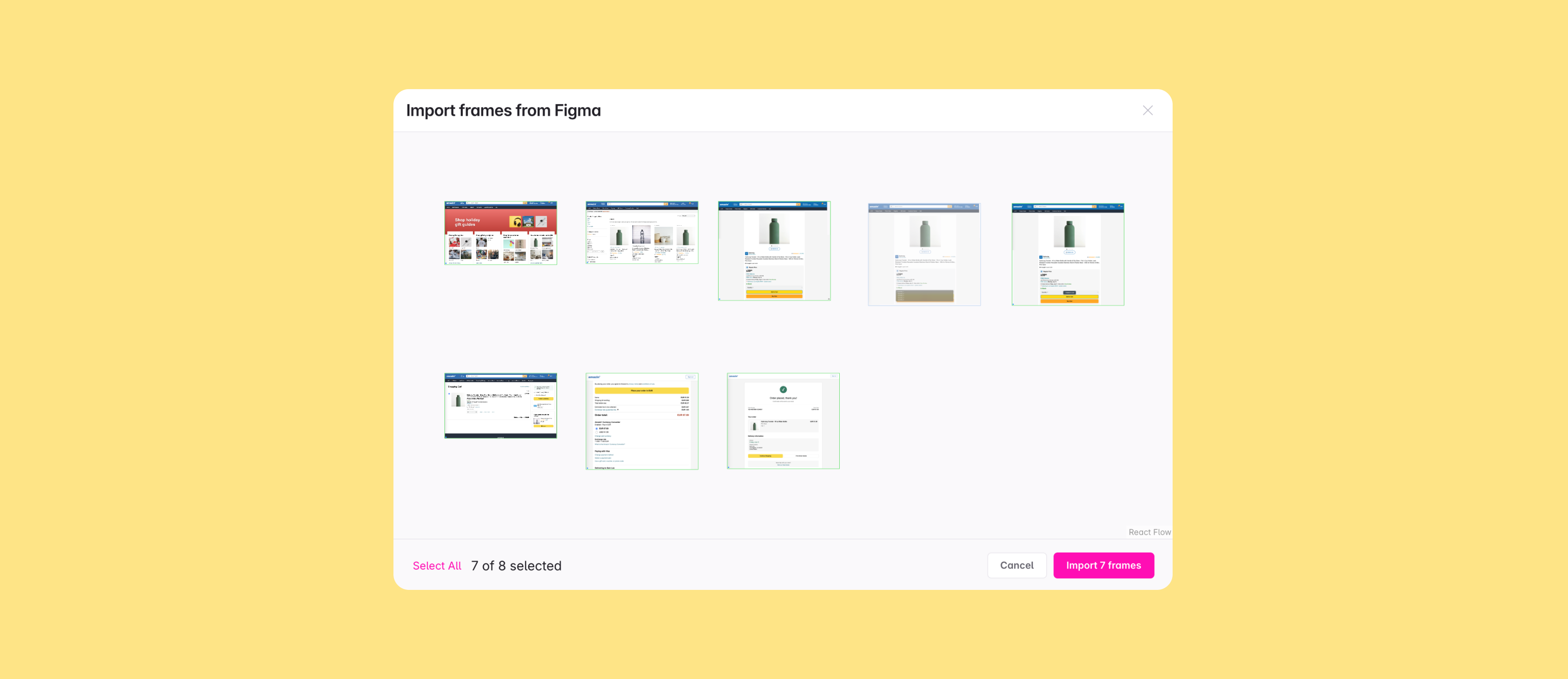
If you use Avo and Figma, you've probably done this: export Figma screens one by one, download the PNGs, upload them into a journey, and arrange everything by hand. We built the Figma integration to eliminate this manual import process.This integration has been the most-requested improvement to Journeys since we launched it, and it's finally here.
Also in this newsletter:
- Property conditions for nested object properties in journey triggers
- Clearer Events and Properties views
- Full bidirectional schema sync with external schema registries
- New Library Interface and a big batch of other Codegen improvements
- Custom events nested inside other metrics
- What's next: new governance features and Avo MCP in public beta
🎨 Avo speaks Figma now

We heard over and over that the biggest friction for journeys was getting the designs into Avo. Now you can import them directly from Figma. The workflow is simple: select a frame in Figma. Copy link to selection. Paste into a journey. The screens land in your real layout, ready to annotate.
- One paste, any link. Selecting a frame, section, and file all work. Right click the selection or hit cmd/ctrl+L and you have your link. Section and file links open a spatial picker that mirrors your Figma canvas.
- Frames land with context. Original frame names become step titles. Layout from Figma is preserved, and frames in the same row come in already connected.
- Stay in sync. Each step keeps a link to its source frame. Hover for View in Figma and Reload from Figma.
- One-time setup. An admin or editor connects Figma from Settings → Integrations → Figma.
Read the launch post → Avo speaks Figma now
Read the docs → Importing steps from Figma
🪺 Conditions on nested properties in journey triggers

Many tracking plans group related data into object-type properties. Until now, journey trigger property conditions only worked on the top-level ones. If your Add to Cart event had a Product object with Characteristics containing Color, Size, and Brand, you couldn't capture "this trigger sends Color = blue" precisely on the journey. Now you can.
Nested conditions work the same way top-level ones do: same operators, same code snippets, same respect for variant logic. The picker shows the full hierarchical path and searches on leaf names, and parent and child conditions resolve independently on the same trigger.
Read the docs -> Nested property conditions
🖼️ Clearer Events and Properties views
Variants, object properties, and name mapping let you define your tracking plan with precision and detail. In the past few weeks we've been improving visibility and filtering for all three: events and properties with name mapping, properties attached to variants, and properties nested in objects.
- Name mapping is now a column and a filter in both the events and properties views
- List property filter in the Properties view, to find array-typed properties quickly
- Parent Objects column showing which objects a property is nested under
- Nested object properties and variants are now included in the events and sources columns in the properties view. This means you will never see “No events” in the events column, unless the property is never used anywhere
- Triggers in the diff are now clickable, opening the specific trigger slideover directly in the tracking plan changes view.
🔁 Full bi-directional schema sync
A lot of Avo customers run a downstream registry alongside their tracking plan and they have been asking for a fuller round trip. Now we’ve closed both halves of the loop.
Export now carries more, and only what changed.
- Owner column in CSV export, with owning and stakeholder domains. Matches the JSON Schema export and round-trips with CSV import.
- changedEventsOnly for Export API and webhooks, plus a new removedEvents array so downstream consumers can sync deltas and clean up properly without having to process the entire tracking plan schema.
Import is now the other half of the round trip.
- Imports accept Avo's JSON Schema export directly, with Avo-specific metadata preserved end-to-end.
- New addUpdateAndRemove import method. Delete a field in your registry and it disappears from the matching Avo events on the next sync. addOnly and addAndUpdate are still there for safer merges.
With these updates, the loop is whole. Ownership flows through, deltas replace snapshots, removals propagate. Full bi-directional sync.
Read the docs -> Export tracking plan
Read the docs -> Import tracking plan
🛠 Codegen improvements
Avo Codegen has historically produced one big generated file per source (with optional one-file-per-event on Web). That works fine for single-source setups but gets awkward at scale, when teams want to share runtime code across applications or independent modules. This release starts enabling a new modular approach, with a handful of polish items alongside.
Library Interface mode
Now you can use a Library Interface mode for Swift, Kotlin and TypeScript. It splits the output into a stable, source-agnostic library file and a per-source app file. The library file ships cleanly as a shared dependency and can orchestrate multiple sources.
Read the docs -> Library Interface mode
Other improvements
- Swift 6 strict concurrency. Generated Swift types are now Sendable
- Per-source "Disable polyfills" toggle for JS/TS Web sources.
📊 Custom Events as building blocks for metrics
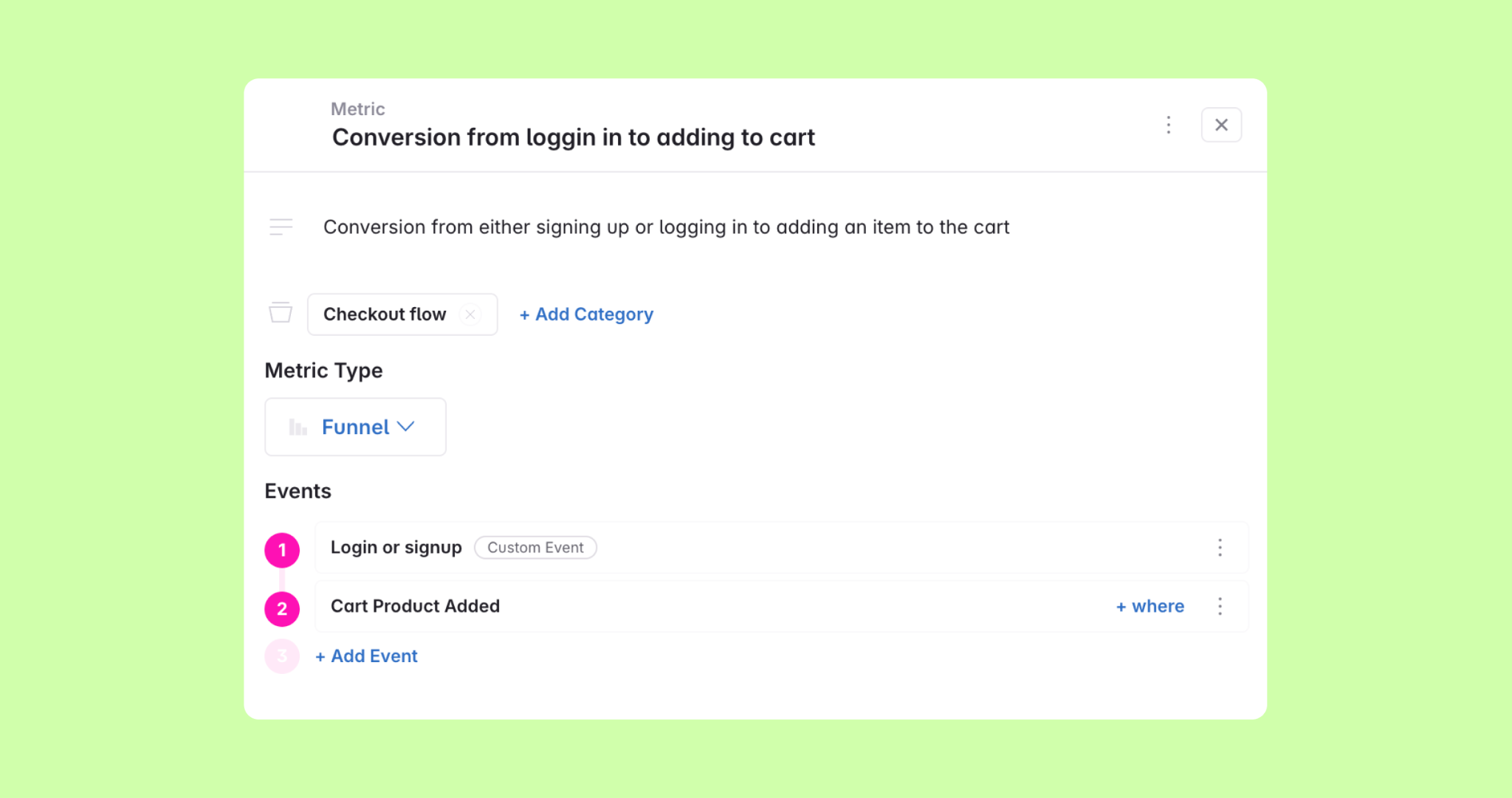
We introduced custom events as a new metric in the last newsletter. Custom events are a collection of events with optional filters. Until now, that shape was only available as the metric itself. If you wanted the same definition inside another metric, you had to redefine the conditions every time and hope nothing drifted.
Now you can nest a custom event metric inside another metric, as a building block in all other metric types. They appear with a Custom Event pill so they're easy to spot among standard events.
Read the docs → Custom events in Avo
🔮 What's next
A couple of things we're working on that you can engage with now:
More Governance for Enterprise. Workspace-level controls to define PII properties and custom fields, with the rules around them. Reply if you'd like early access.
Avo MCP is in public beta. Anyone can connect their AI tools (Cursor, Claude, Copilot, and others) to their Avo workspace through the MCP. We're actively adding more functionality for the MCP. See the docs for what's supported today, and reply to tell us where you hit walls.
Read the docs → Avo MCP overview
As always, we would love your feedback. If the Figma integration changes how your team builds journeys, we want to hear about it. Hit reply.
Happy importing 💜
Block Quote