

In this article
Product updates
From Figma to Tracking Plan in Minutes
Introducing Avo Journeys and AI assisted data design
Picture this: your product team just dropped the latest Figma designs for a critical feature. You already know what comes next. Hours spent pulling screenshots into Miro or FigJam, marking every interaction, cross checking what already exists in your tracking plan, then recreating it all manually for implementation.
What if that entire workflow could happen in minutes instead of hours?
Today we are introducing Journeys and AI assisted data design in Avo. A new way to translate product designs into high quality tracking requirements, directly inside your governed tracking plan.
The problem: tracking design is still stuck in the dark ages
Across companies, both Avo customers and not, we heard the same story. Teams design analytics outside the tracking plan. They build flows with screenshots, on whiteboards, and in scratch docs, relying heavily on memory and tribal knowledge.
The result is a slow, brittle workflow held together by manual effort.
Bottlenecked on a few experts
Tracking design requires deep context and familiarity with the taxonomy. Only a small group of experts feel confident doing it. Product managers and engineers, who understand the user journey best, rarely contribute directly. Everything funnels through a handful of analysts who struggle to keep up.
“We have five product owners and usually I am doing all the tracking design. It is a pretty big bottleneck. It is difficult to integrate everything in good timing.”
— Director of Data, Digital publishing company
The cost is high. Overloaded analysts. Delayed features. And less time spent on the analytical work that drives impact.
Manual and repetitive workflow
Across teams, the story is the same: translating designs into tracking spec is slow, tedious, and disconnected from the rest of the workflow. Analysts spend hours parsing design files, reading product specs, and going back and forth with product managers just to understand what matters. They annotate each screen with user actions and event specs, then rebuild the entire thing again in the tracking plan.
“We have to plan in Figma and then transfer to Miro, then manually copy everything into the tracking plan. There is so much duplication of work.”
— Sr. Product Analyst at Global consumer services company
It’s important work, yet analysts end up doing manual data entry across disconnected tools, creating multiple sources of truth and no reliable overview.
Inconsistent and hard to trust
When tracking is designed outside the governed tracking plan, external artifacts often become the actual implementation instructions. Typos, misinterpretations, missing details, and naming variations slip into production. Events that should be reused are duplicated. Properties drift between features. The plan falls out of alignment with reality.
“There’s always a disconnect between design and tracking. We spend a lot of time debating what should actually be firing.”
— Data Analyst, Consumer app company
This leads to broken dashboards, confused stakeholders, engineering rework, and growing hesitation to let non experts contribute.
The solution: Journey first, AI assisted data design in Avo
Teams have told us they need a better way. A way to design tracking where it actually happens. Inside the user journey. Inside the governed tracking plan. Not spread across screenshots and side documents.
Journeys and AI assisted data design are built directly into the core of Avo to make this possible. Instead of stitching together context across tools, teams now design tracking visually, step by step, with clarity and consistency.
Enabling the whole team to contribute
Journeys make tracking design intuitive for product managers, designers, engineers, and analysts because they can work visually, much like they already do in Figma or Miro. AI identifies meaningful interactions, suggests triggers to describe them, and recommends the most relevant events based on your tracking plan. Data teams retain governance and approval, without carrying the entire workload.
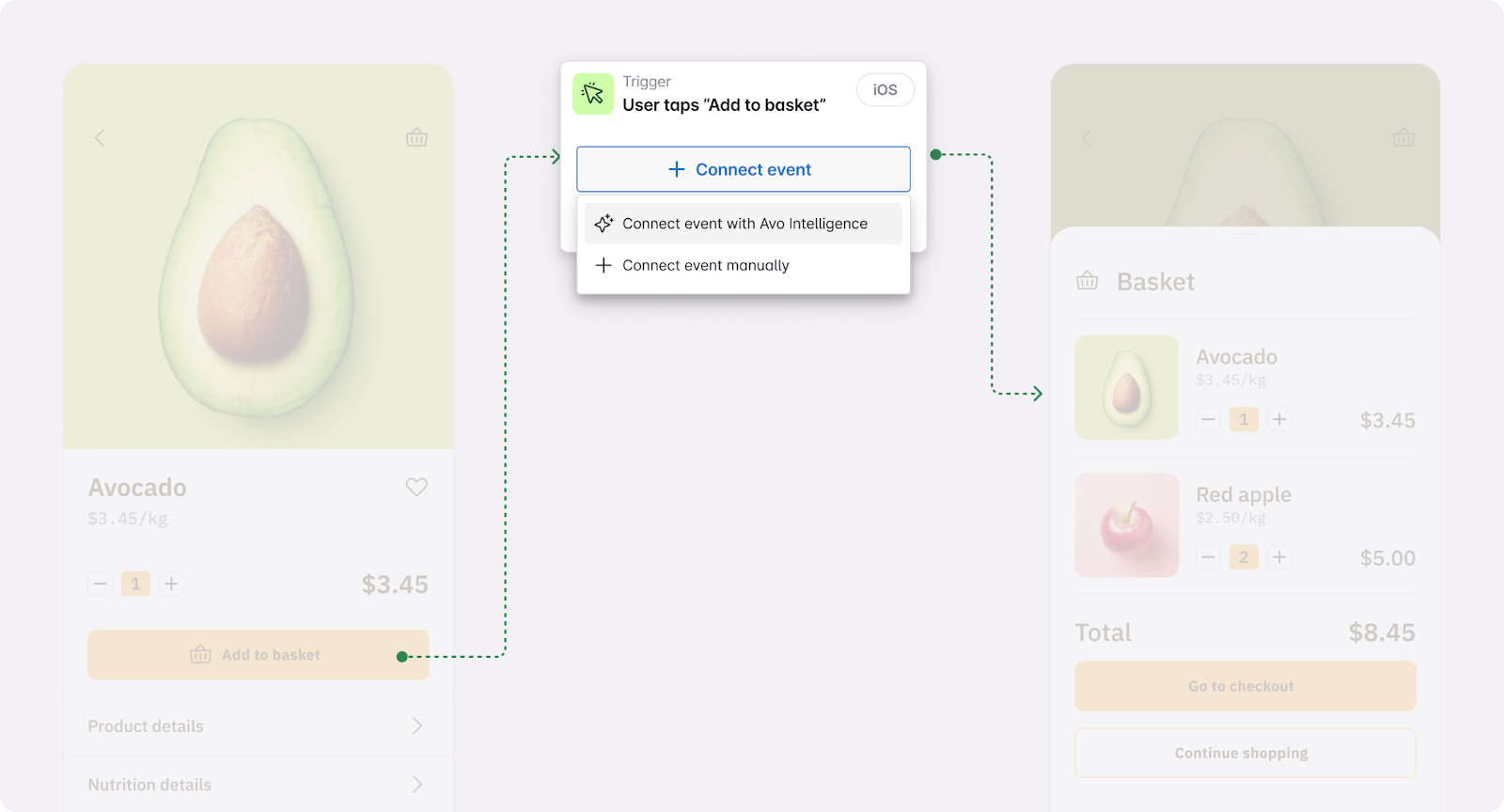
“This workflow is so much better. It will shift tracking design from data team to product team.”
— Director of Data, Publishing company
PMs contribute as experts in the user journey. Engineers understand exactly what to implement. Data teams focus on structure and standards rather than mechanical translation.
The result is a healthier, more scalable data practice. Analysts get to spend more time extracting value from the high quality data being produced rather than being a reactive bottleneck slowing down feature releases.
Single source of truth with visual context
Journeys let teams design, review, and implement tracking directly inside the tracking plan. Product screenshots or designs form the structure of the journey, with annotations that capture the user actions and system behaviors that matter. Triggers link these annotated moments to the events that represent them in your tracking plan.
This gives product, data, and engineering a shared picture of exactly what is tracked and why. The journey view shows exactly where each event fires. Event details show every screen and scenario that uses it, including property requirements and contextual notes. Developers receive ready to use code snippets tied to real screens and scenarios, which removes ambiguity during implementation.
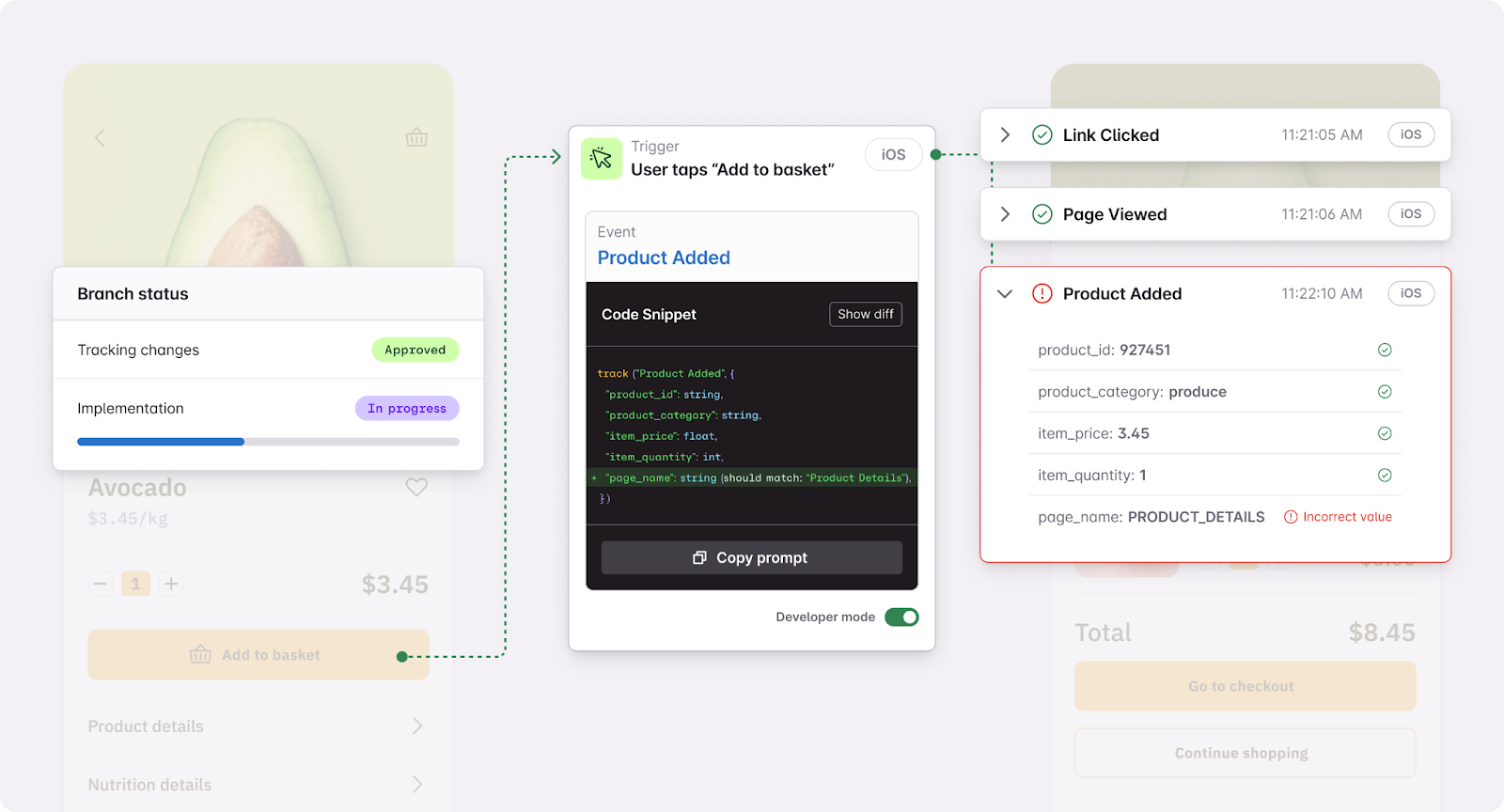
“Being able to highlight parts of the screen and tie them directly to events is exactly what our engineers need.”
— Sr. Product Analyst, Global consumer services company
Avo becomes the single place to design, review, and implement tracking.
Journeys integrated into a governed tracking plan
Because Journeys sit directly on top of the governed tracking plan, all events, variants, and properties come from the source of truth. Nothing is created in isolation. Everything reinforces consistent patterns across teams and products.
“Teams create duplicate events unknowingly. Using AI to help with reusing events, really helps cut significantly down on development time.”
— Data Engineer, Financial services company
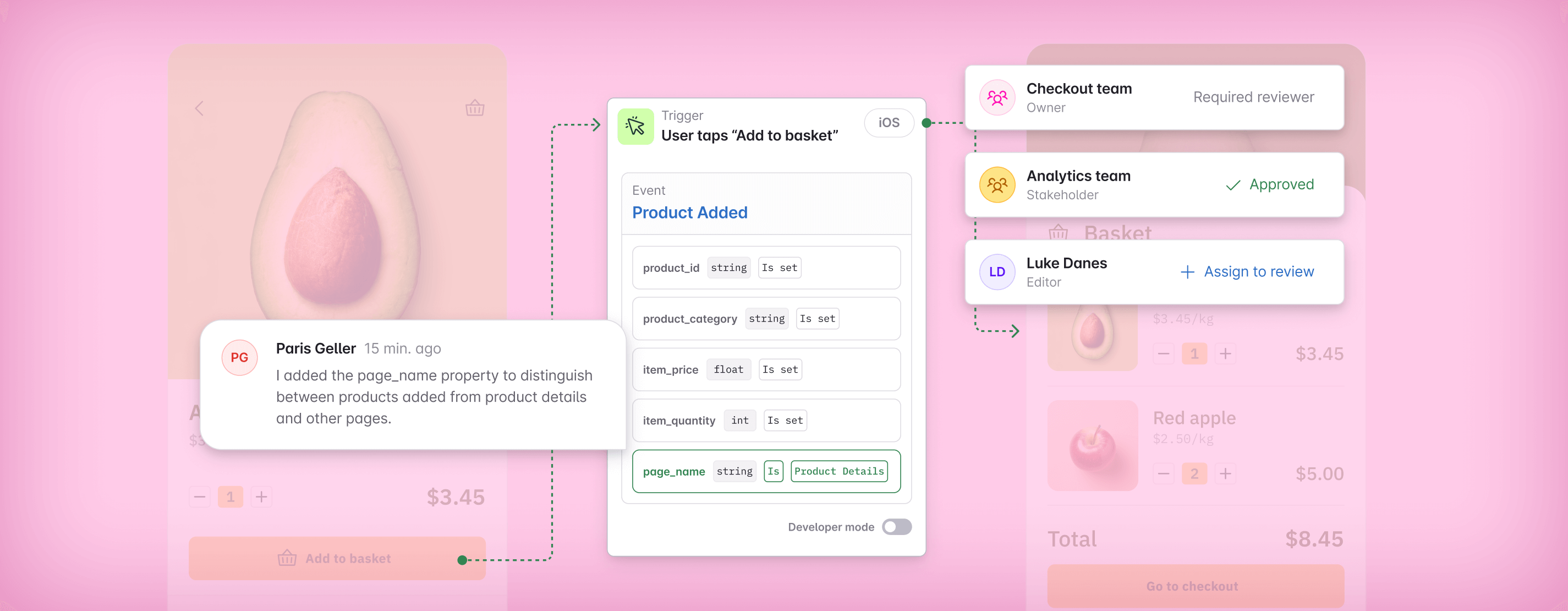
You can also define scenario specific property conditions. Which optional properties must be sent. Which values apply on a given screen. Any contextual examples or notes. This eliminates ambiguity for developers and analysts alike.
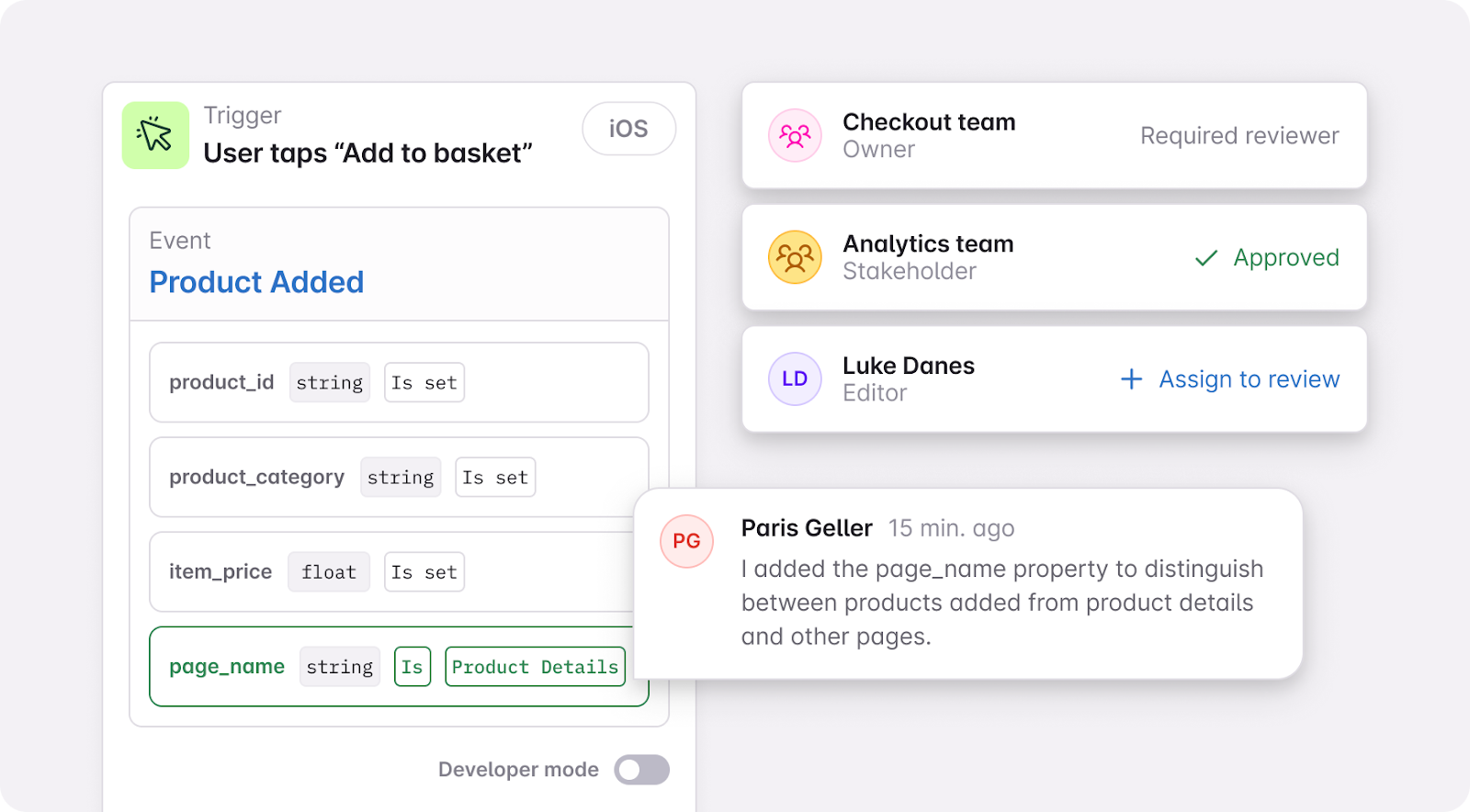
Grounding tracking design in journey context prevents drift and aligns design and implementation from the start.
How Journeys fits into the Avo workflow
Journeys is not an add-on or a separate workspace. It extends the Plan → Review → Implement workflow your team already uses, adding visual context and AI assistance where they make the biggest impact.
- Plan on a branch: upload screens, map the flow, add triggers, connect events, define property conditions and use AI where it helps.
- Review with context: evaluate proposed tracking in the context of the actual user journey and provide your feedback
- Implement confidently: implement using code snippets that are tied to the exact buttons that trigger the events
Journeys becomes the new center of data design in Avo. It has always been collaborative and governed, and now it’s visual and AI assisted too.
Check out our docs for detailed instructions on how to build journeys and how to use AI assisted data design.
Getting Started
Journeys is available in the tracking plan for all Avo customers without additional cost.
AI powered event and trigger suggestions are available when Avo Intelligence is enabled in workspace settings and are included on paid plans with beta pricing. Each tracking plan editor receives 50 credits to try AI for free.
If you want help rolling this out, or would like us to demo it using your own Figma files and flows, we are happy to walk through it with you.
Talk to us about purchasing more credits and rollout: support@avo.app
This is just the beginning of both Journeys and AI assisted data design. Keep posted on how we expand journeys and what AI agents we build next.
We’re so excited to see what you build with it. Please share all your feedback with us!
Block Quote